 ARCAT
ARCATFind your ARC House profile link
Follow these steps in Chrome on a computer. Select any screenshot to view it at full size.
Log in to ARC House and open:
https://community.arc.io/home/profilePress F12 to open Chrome Developer Tools.
Click “»”, then “Network”, and then “Fetch/XHR”. Finally, refresh the page.



Type “graphql” into the “Filter” input box.

Click the first “graphql” request, then click “Preview”, followed by “data”.



Press Ctrl + F, then search for “clientId”.

Copy the value inside the quotation marks and append it to the end of this URL:
https://community.arc.io/home/users/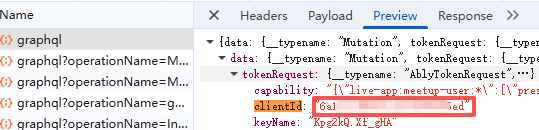
Open the resulting link and confirm that it leads to your profile page. Then submit it.